


AI workflows have become a juggling act.
You ask Claude for one pass, GPT for another, maybe run a local model for privacy or speed, then start copying ideas between tabs to see where they agree or sharpen each other. The models are useful. The workflow is not.
Polyphon is our attempt to fix that.
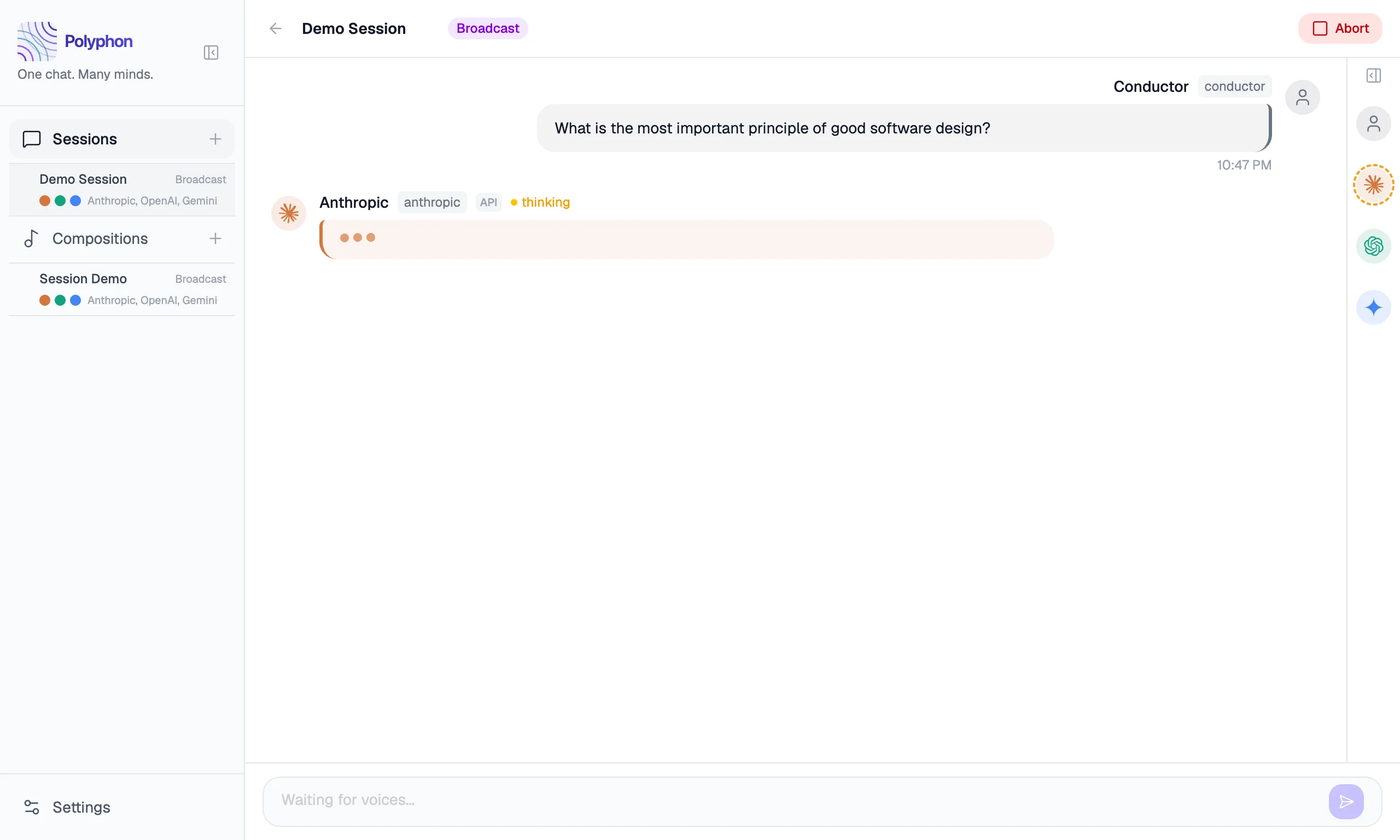
Today we’re shipping Polyphon — the first public alpha of a desktop application for orchestrating conversations between multiple AI voices simultaneously. Not multiple windows. Not a stack of pasted transcripts. One conversation, many voices, and a conductor in the middle.
Why We Built It
The interesting part was never just what one model said. It was what happened when different models approached the same prompt from different angles.
Ask three voices to review a technical spec. One finds the ambiguity. One proposes the architecture. One rewrites the brief into something sharper. The value isn’t in any single response — it’s in the synthesis. But getting to that synthesis meant doing the orchestration manually: tab-switching, copy-pasting, mentally tracking which model said what.
Polyphon turns that manual coordination into a single shared conversation.
In Polyphon, each AI participant is a voice. You build a group of voices, start a session, and send a prompt. Voices respond in rounds and can read each other’s replies — creating genuine cross-model dialogue, not just a collection of independent answers. Save that group as a composition and reuse it whenever you want the same ensemble again.
You are the conductor. The AI models are the ensemble.
What’s In This Alpha
The core loop is working.
Sessions run in two modes: broadcast, where your message goes to all voices simultaneously, and conductor, where you direct a message to one specific voice. You can set a voice to auto-continue responding after each round, enabling back-and-forth between voices without your involvement.
Polyphon supports three kinds of voices:
- API voices — Anthropic Claude, OpenAI GPT, Google Gemini (your key, your billing)
- CLI voices —
claude,codex,copilot(local binaries, no API key required) - Custom OpenAI-compatible voices — Ollama, LM Studio, vLLM, or any compatible endpoint
These aren’t separate tracks. A voice is a voice. A single composition can mix a cloud model, a CLI tool, and a local endpoint in the same conversation. You can also shape each voice independently: set per-voice tones, attach system prompt templates, and configure a conductor profile that injects your name and context into every session automatically.
To get started you’ll need your own API keys or local CLI tools already installed — the documentation walks through setting up each provider.
Local-First, No Telemetry
Polyphon is a desktop app, and we want it to behave like one.
Your sessions and compositions stay on your machine — stored locally via SQLite. API keys are never stored by Polyphon; they are read directly from environment variables on your system. There is no Polyphon account required, and there is no telemetry from the application.
This isn’t a marketing layer on top of a cloud product. It’s a core design constraint. A lot of people experimenting with multiple AI voices are working with drafts, code, notes, or research they’d rather keep under their own control. The default environment for that work should be yours.
Why This Is An Alpha
When we say alpha, we mean:
- the product is usable now
- the UX will keep evolving quickly
- feedback matters more than surface polish at this stage
The core experience is solid — multi-voice sessions, all provider types, compositions, broadcast and conductor modes, tones, templates, conductor profile. But there are rough edges. We’ve been using it daily, and that’s exactly how we know what still needs work.
A note on the version number: alpha.1 was an internal build. This is the first public release.
What’s Next
The near-term focus is Session Export — Markdown, JSON, and plain text transcripts — and Plugins, a proper extension model for adding new voice providers and session behaviors. The full roadmap is public and built in the open.
Get Involved
Polyphon is free. Period. No subscriptions, no accounts, no credit card required. Download it, run it, keep it.
Download Polyphon for macOS (.dmg).
Get started with the documentation — it covers installation, configuring your first voices, and starting your first session.
- Find a bug or have an idea? Open an issue
- Want to talk through how you’re using it? Join GitHub Discussions
This is version one of something we’re just getting started with. We’re glad you’re here.
What voices would you put in your first composition?